Codypendent
On this page
The problem
A coding session should survive switching interfaces. Conversation history, tool execution, approvals and repository state need one owner rather than separate implementations in every client.
What I’m building
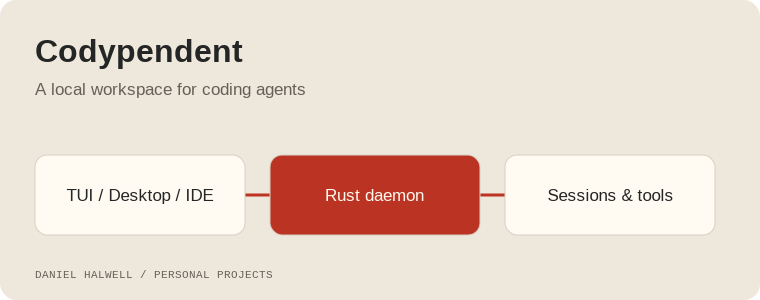
Codypendent centres the product on a Rust daemon. Terminal, desktop and IDE clients use the same sessions and execution machinery. The repository includes a TUI, Tauri desktop application, CLI, web client and IDE integrations.
Design decisions
The daemon owns session state and tool execution. Clients concentrate on presenting that state and collecting input. Git worktrees give parallel work separate checkouts; approvals and sandbox controls sit at the execution boundary.
Recovery matters as much as the initial happy path. Draft retention, interrupted streams, tool-card readability and session restoration are part of the application work.
Evidence and status
The public repository contains the clients, daemon, protocol and release history. Development covers session continuity, approvals, worktree isolation and recovery across the interfaces.
Explore
Start with the architecture, the CLI and TUI user guide, or the releases for available builds.
Following one session across clients
A shared backend lets the interface change without starting the task again. A terminal user needs compact keyboard flows, a desktop user needs visible tools and panes, and an editor user needs selected code and diagnostics. They still need to agree on the conversation, pending approvals and files being changed.
The Rust daemon is the owner of that state. The client/daemon protocol carries events to interfaces instead of making each frontend maintain a separate agent loop. That boundary also gives interruption, cancellation and reconnection one place to be handled.
Working with repositories
Git worktrees provide separate working directories for concurrent tasks. The workspace must make the current repository and task visible, show changes before they are accepted, and preserve drafts when a session is interrupted. A readable tool trace connects the requested action with the resulting edit or command output.
The project includes provider routing, skills, MCP tools and ACP agent integration. These are different ways of bringing execution into a session; their permissions and configuration still belong at the backend boundary.
Interfaces and scope
The implemented surfaces include the Ratatui terminal interface, Tauri desktop app, CLI, web client and VS Code/Cursor extension. Zed can use the ACP serving path. A JetBrains plugin is planned rather than implemented. The repository’s broader roadmap includes collaborative documents, knowledge and plugin workflows; individual capabilities should be checked against their implementation and guide.
Try a small task first
The CLI and TUI guide covers launching the workspace and its keyboard controls. Begin by asking a configured agent to explain a small repository, inspect the trace, and follow the approval flow before expanding the task. The release history identifies available builds; this page does not imply that every planned interface or packaging target is complete.